Let's learn how to create the template for the reinforcement style — Wall Double Mesh With Vertical Overhangs.
Technical Task
Before creating a style template, we will take a look at the technical task, according to which we will create a file of parameters in JSON format and write a script in Lua.
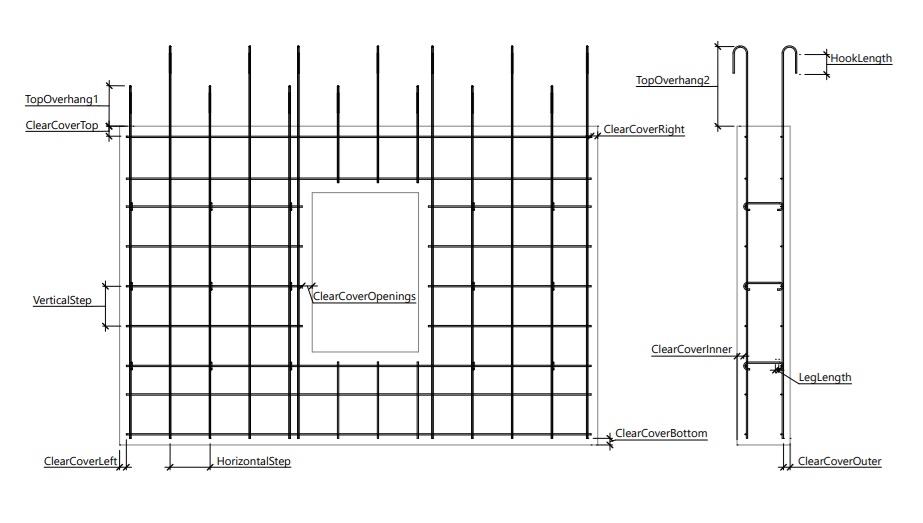
| Group/Parameter | Description | Type | Default | Min | Max |
| ClearCover | ClearCover | | | | |
| ClearCoverInner | Inner | Length | 20 | 0 | 100 |
| ClearCoverOuter | Outer | Length | 20 | 0 | 100 |
| ClearCoverLeft | Left | Length | 20 | 0 | 100 |
| ClearCoverRight | Right | Length | 20 | 0 | 100 |
| ClearCoverTop | Top | Length | 20 | 0 | 100 |
| ClearCoverBottom | Bottom | Length | 20 | 0 | 100 |
| ClearCoverOpenings | For door and window | Length | 25 | 0 | 100 |
| LongitudinalRebar | Longitudinal rebar | | | | |
| RebarStyleId | Style | Id | | | |
| Step | Step | Length | 300 | 50 | 500 |
| TransverseRebar | Transverse rebar | | | | |
| RebarStyleId | Style | Id | | | |
| Step | Step | Length | 300 | 50 | 500 |
| Overhang | Overhangs | | | | |
| UseHook | Use hook | Boolean | true | | |
| TopOverhang1 | Top overhang 1 | Length | 300 | 0 | 1000 |
| TopOverhang2 | Top overhang 2 | Length | 600 | 0 | 1000 |
| HookLength | Hook length | Length | 150 | 0 | 500 |
| CShapedFixator | C-shaped fixator | | | | |
| RebarStyleId | Style | Id | | | |
| LegLength | Leg length | Length | 15 | 0 | 100 |
| HorizontalStep | HorizontalStep | Length | 2 | 1 | 10 |
| VerticalStep | Vertical step | Length | 2 | 1 | 10 |
| UseChessOrder | Use chess order | Boolean | false | | |
Parameters Description File
According to the technical task, we create a parameters file using the structure detailed in the Style Templates of Reinforcement Units.
See the resulting file in the parameters file.
Script
Setting up the parameters states in the reinforcement style editor
To set up the reinforcement style parameters, use SetStyleParameterStates(). An instance of the ParameterContainer() class is passed to this function. This instance we use to hide or show the HookLength parameter, depending on the value of the UseHook parameter.
function SetStyleParameterStates(parameters)
local values = parameters:GetParameterValues()
-- Hide or show the HookLength parameter, depending on the value of the UseHook parameter.
parameters:GetParameter("Overhang", "HookLength"):SetVisible(values.Overhang.UseHook)
end
Creating reinforcement
The mesh should consist of a row of longitudinal rebars and a row of transverse rebars. User will set the reinforcement style and step for both rows. Let's create a function that we will use for the rows:
function rebarRowParameters(group)
local rebarStyleId = group.RebarStyleId
end
Rebars layout with edge protection.
Definition RebarRowEdgeProtectionLayout.h:16
Parameters of the row of rebars.
Definition RebarRowParameters.h:26
The transverse rebars should have top overhangs with the possibility of specifying their length and the option of using a hook. Let's create a function to specify overhang rules using the RebarOverhangParameters constructor:
function createOverhangRules(styleParameters, hookAngle)
local overhangValues = {
styleParameters.Overhang.TopOverhang1,
styleParameters.Overhang.TopOverhang2
}
-- If the user will use a hook
if styleParameters.Overhang.UseHook then
math.pi,
styleParameters.Overhang.HookLength,
hookAngle
)
else
-- If the user will not use a hook
end
end
WallSide
Wall side.
Definition ObjectSide.h:21
Selects the faces of an object that match the specified side.
Definition FaceSelector.h:52
Rebar hook parameters.
Definition RebarHookParameters.h:21
Rebar overhang parameters.
Definition RebarOverhangParameters.h:20
Using the DoubleReinforcingMeshParameters structure, we specify the parameters for creating two reinforcement meshes:
function meshParameters(styleParameters)
local longitudinalParams = rebarRowParameters(styleParameters.LongitudinalRebar)
--
Front mesh (inner, hook rotation angle is 180°)
local transFront = rebarRowParameters(styleParameters.TransverseRebar)
transFront.OverhangRules = createOverhangRules(styleParameters, math.pi)
--
Back mesh (outer, hook rotation angle is 0°)
local transBack = rebarRowParameters(styleParameters.TransverseRebar)
transBack.OverhangRules = createOverhangRules(styleParameters, 0)
-- Meshes
-- C-shaped rebar (Length = 1 for auto-tuning)
styleParameters.CShapedFixator.RebarStyleId,
1,
styleParameters.CShapedFixator.LegLength
)
-- Rebar mesh supports layout with setting the number of cells passed between the elements
styleParameters.CShapedFixator.HorizontalStep,
styleParameters.CShapedFixator.VerticalStep
)
-- If the user will use chess order
if styleParameters.CShapedFixator.UseChessOrder then
layout.Displacements = {1, 0}
end
-- Reinforcing mesh supports
-- Double reinforcing mesh with supports
return doubleMesh
end
@ Front
Front.
Definition ObjectSide.h:26
@ Back
Back.
Definition ObjectSide.h:27
Parameters of C-shaped rebar.
Definition CShapedRebarParameters.h:27
Double reinforcing mesh creation parameters. The front and back meshes are determined by the viewing ...
Definition DoubleReinforcingMeshParameters.h:29
ReinforcingMeshSupportsParameters Supports
The reinforcing mesh supports parameters.
Definition DoubleReinforcingMeshParameters.h:48
Rebar mesh parameters.
Definition ReinforcingMeshParameters.h:22
Rebar mesh supports layout with setting the number of cells passed between the elements.
Definition ReinforcingMeshSupportsCellLayout.h:30
Rebar mesh supports parameters. To support vertical meshes, C-shaped rebar in combination with a layo...
Definition ReinforcingMeshSupportsParameters.h:29
Using the CreateObjectReinforcement() function, we apply reinforcement to the object and consider the protective layers.
function CreateObjectReinforcement(object, styleParameters)
-- Защитные слои
local clearCoverRules = {
-- Защитные слои для окон и дверей
}
object,
clearCoverRules,
meshParameters(styleParameters)
)
end
ReinforcementContainer CreateDoubleReinforcingMeshInBaseLayer(Entity object, table clearCoverRules, DoubleReinforcingMeshParameters meshParameters, EdgeReinforcementParameters oEdgeReinfParameters, double oFrontOffset, double oBackOffset)
Creates a double reinforcing mesh in the object base layer. Currently Walls and Floors are supported.
ModelObjectType
Object types.
Definition ModelObjectType.h:29
Selects the faces of an object that are formed by intersection with another object.
Definition FaceSelector.h:24
For a full style template sample, see link.

 1.16.1