Route
The Route  tool allows you to create routes between the end ports of engineering system objects, considering the specified parameters of the selected system.
In order to build route:
- Select the Route tool.
- Set route Parameters:

Группа систем. 
Категория системы. 
Стиль системы. Defines the designation and color of the system.

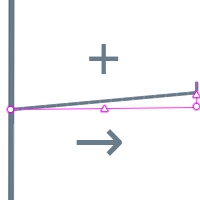
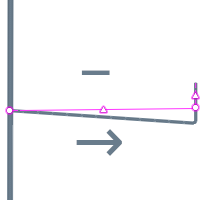
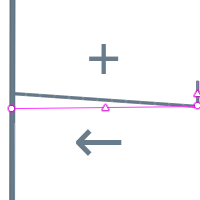
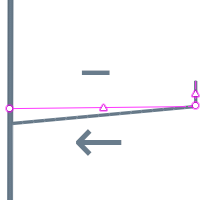
Slope. Available for pipe and duct systems. The slope is set for the entire section of the route and defines the location of pipes and ducts on the horizontal sections of the route. The slope direction depends on the route construction direction. The slope value is calculated from the beginning of the route and can be positive or negative.
- Change the measure mode to Cubic, Cylindrical or Spherical.
- Move the mouse pointer to the connection port for the selected system type.
- Left-click the connection point and move the pointer onto the connection point of another object or any spot on a route.
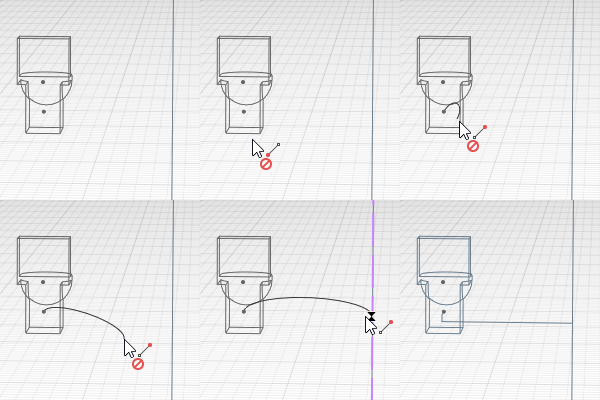
- Rebuild the route with other parameters or edit the route if necessary.

|
Please note: in Electrical systems you can build a route between objects only. The connection of object and piece of route is not available. |
|
|
If it is not possible to build an object, such as a pipe on a route, a sign will be displayed notifying that the object cannot be built: |
 . This means that the object must be edited using handles or its style must be changed.
To copy or move the created route, Select in model the route and the connected equipment.
 See also